Getting started
This tutorial walks you from a fresh install to a processed observation CSV. By the end you will have run the full pipeline on a small set of camera images and understand what each step produces.
Prerequisites
- Miniforge or Anaconda installed
- Camera-trap JPEG images with a metadata strip at the bottom (see architecture)
- A trained classifier checkpoint (
models/hummingbird_classifier.pt), or use the ImageNet backbone for a first test run
1. Install the package
git clone https://github.com/rgutzen/Humming_Bird_Detection
cd Humming_Bird_Detection

conda env create -f environment.yml
conda activate humming_bird_detection
pip install -e .
Verify the install:
2. Download the YOLO checkpoint
The pipeline uses YOLO11n pre-trained on COCO. Place the weight file at models/YOLO/yolo11n.pt:
mkdir -p models/YOLO
# download from https://github.com/ultralytics/assets/releases
wget -O models/YOLO/yolo11n.pt https://github.com/ultralytics/assets/releases/download/v8.3.0/yolo11n.pt
3. Check the configuration
Open data/interim/pipeline.yaml. The defaults work out of the box; the only value you might need to change is image.margin_px — set it to the pixel height of your camera's metadata strip.
4. Run the pipeline
from humming_bird_detection.config import load_config
from humming_bird_detection.models.detector import build_detector
from humming_bird_detection.models.classifier import build_classifier
from humming_bird_detection.workflow.pipeline import process_directory

cfg = load_config()
detector   = build_detector(cfg)
classifier = build_classifier(cfg)

df = process_directory(
    input_dir="path/to/your/images",
    output_csv="output/observations.csv",
    detector=detector,
    classifier=classifier,
    cfg=cfg,
)
print(df.head())
5. Inspect the output
The pipeline produces two CSVs in your output directory:
observations.csv— one row per detected bird. Includesfilename,date,time,camera,is_hummingbird,classification_confidence,detection_confidence,is_duplicate,is_suspected_duplicate, andbbox_x1/y1/x2/y2(bounding box in original-image pixels).observations_per_photo.csv— one row per photo. Aggregates bird counts (num_hummingbirds,num_other), confidence statistics, and duplicate flags.
The bird-level CSV has these columns:
| column | description |
|---|---|
filename |
source image filename |
date, time |
from camera OCR |
temperature |
temperature (F) from OCR |
camera |
camera ID from OCR |
bird_index |
index of this bird within the photo |
bbox_x1/y1/x2/y2 |
bounding box in original-image pixels |
is_hummingbird |
True = hummingbird, False = other bird |
classification_confidence |
P(hummingbird) — NOT general certainty (see note below) |
detection_confidence |
YOLO confidence (0–1) |
is_duplicate |
motion-event duplicate flag |
is_suspected_duplicate |
composition-based duplicate flag |
classification_confidence is not certainty
The value stored is the sigmoid probability of the hummingbird class — it
is high for hummingbirds (~0.9+) and low for other birds (~0.0001).
The analysis report includes a separate classifier certainty metric
that folds this to 1.0 = "fully certain about the assigned label" for
both classes. Do not average classification_confidence across mixed classes.
Example output:
| filename | date | time | camera | bird_index | bbox_x1 | ... | is_hummingbird | classification_confidence | detection_confidence | |---|---|---|---|---|---|---|---|---|---|---| | WSCT0033_001.JPG | 07 APR 2025 | 07:14 AM | CAMERA 3 | 0 | 240 | ... | True | 0.93 | 0.87 | | WSCT0033_002.JPG | 07 APR 2025 | 07:14 AM | CAMERA 3 | 0 | 180 | ... | False | 0.08 | 0.72 |
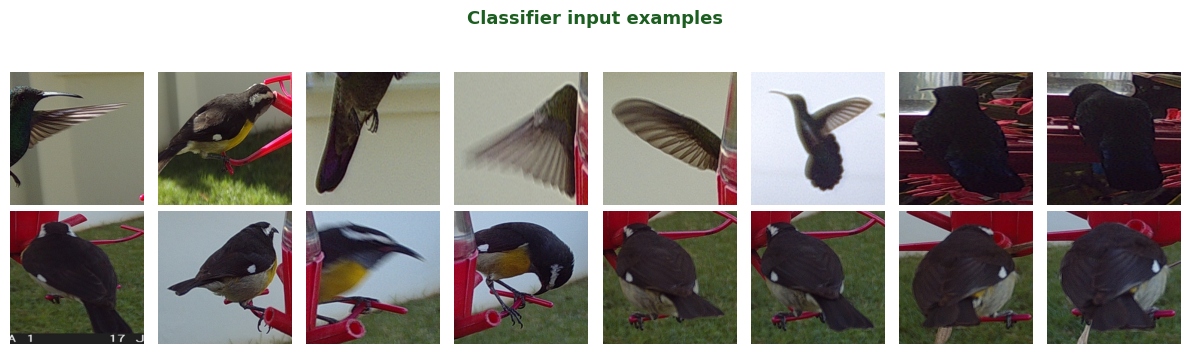
The classifier distinguishes hummingbirds from other bird species visiting the feeder:
6. Generate an analysis report
from humming_bird_detection.workflow.analysis import generate_report

print(generate_report(df, cfg))
This prints a comprehensive terminal report covering camera efficiency (blanks vs birds), per-camera breakdowns, hourly and daily activity distributions, confidence statistics, and duplicate analysis.
Next steps
- Improve accuracy: fine-tune the classifier on your own images — see Fine-tune the classifier.
- Tune detection: adjust
detector.confidence_thresholdanddetector.slice_size— see Configuration reference. - Understand the design: see Pipeline architecture.